Monday, January 13, 2014

How To Add Custom Label Widget With Stylish CSS Effect In Blogger


Add Custom Label With Stylish CSS Effect Blogger

I am write the article about - How to Change Blogger widget title background color - Today i am guide you about that, It is very easy, follow my instruction step by step, you can do this easily.

Lets Start Guys.

Step-1
Log-in To Your Blogger Account,

Step-2
Click on Template,

Step-3
Click on Edit HTML,

Step-4
Now Find The Following Code,  ]]></b:skin>
(Hold Ctrl Button, Press F)

Step-5
After Find The Code Past The Below Code in The Box, Before,  ]]></b:skin>

Here is The HTML Code

Metro Style Code
Here is The HTML Code


Step-6
Now Save Your Template,
That's all done, Enjoy Stylish CSS effect Blogger Label Widget.

 Please Share This Article To Friends / Others.


NOTE
If You See Any Broken Link Tell Me On Comments.
If You Like This Post Please Share It With Your Friends.

Please Tick in Reactions in The End of Post.

How To Change Gadget Title Background In Blogger Freeware


Change Widget Title Background in Blogger

I am write the article about - How to Change Blogger widget title background color - Today i am guide you about that, It is very easy, follow my instruction step by step, you can do this easily.

Lets Start Guys.

Step-1
Log-in To Your Blogger Account,

Step-2
Click on Template,

Step-3
Click on Customize,

Step-4
Now Click on Advance and Scroll Down, Click on Add CSS,

Step-5
Copy This Code in The Box Below, And Past in CSS Text Box,

Here Is The CSS Code

Step-6
Now Click on Apply To Blog Button To Save.


NOTE
If You See Any Broken Link Tell Me On Comments.
If You Like This Post Please Share It With Your Friends.

Please Tick in Reactions in The End of Post.

Wednesday, January 8, 2014

How To Install Windows XP Windows 7, 8 From USB Drive Easily

Noviecorp WinToFlash, Install WINDOW'S From USB

Installing Windows from a flash drive! associate degree application that enables you to fully transfer the setup Windows XP, Windows 2003, Windows visual image, Windows 2008, Windows 7, Windows eight on the USB drive in an exceedingly few mouse clicks. this suggests that you just will install Windows from a flash card, HDD or alternative storage device to your PC or net-book. And it is not all she will do. WinToFlash will transfer your live CD / DVD onto the USB drive, as an example, Bart-PE. in any case the technological manipulation, you'll be able to fully clear the flash card and format it in Windows for everyday use.


 Novicorp WinToFlash 

Pull the contents of a Windows XP/2003/Vista/2008/7/8 install disc and prep the USB drive to become a boo-table replacement
Windows 32 bit and 64 bit full support
Support all editions of Windows - Home, Professional, Media Center, Ultimate, etc.
Transfer a Recovery CD or a tiny OS (Bart-PE based on Windows XP/2003, Win-PE based on Windows Vista/2008/7/8) to a USB drive
Wipe a USB media (destroy all data on it)
Create a USB drive with emergency boot-loader for Windows 2000/XP/2003
Transfer MS-DOS to a USB drive
Create a USB drive with Windows XP/2003 Recovery Console
Format USB drive to FAT16 or FAT32
Fine tune any option of FAT file system for better compatibility
Fine tune any option of partitions table
Select boot loader for a USB drive, like GRUB or Standard one
Select partition type - CHS or LBA for better compatibility with some motherboards
Create aswers file for Windows Setup. Add serial number, user name, etc.
Windows Setup transfer process fine tune
Check USB drive for file system errors after Windows Setup transfer process
Fix some Windows Setup problems, like 0x6B BSOD
AntiSMS function to fix boot blockers (send SMS to short number/buy something/etc. to unlock your PC problem) or viruses.
WinToFlash is portable application, you can carry around with you on a portable device and use on any computer
Tranfer profiles support - save your transfer options and load it at any time
Windows serial number encryption in profile with password
Detailed log file
Updates reminder
Easy to use classic interface, like ntbackup utility
Wizard with only two options for quick Windows Setup transfer
Multi language support.

How To Use & Make USB Drive Boot and install Windows
I'm write the article, How to make USB boot-table with Windows installation, Today I'm guide to you about that, it is very easy with few simple steps. Just follow my instruction with screenshot images.
First you do this, Please save your all data on your USB drive to your Computer, Because in the next steps your USB drive is formatting, Please save your pictures and videos of  friends and Girl friends, 

Don't blindly to do that, 
Please Don't Blame me.

Step-1
If you don't have windows setup files download Full-Zip file HERE Torrent file HERE  and save it on your Computer, If you have Windows CD or DVD Disk, Then Insert your windows XP, 7, 8 - CD / DVD to CD / DVD Rom, Create a new-folder in hard drive or where you want to save the Windows files, And then open your CD / DVD Rom and copy all files & folders in CD or DVD to your specific folder you are created.
View More Tips & Download Free Software, Games
http://thaheemsoftware.blogspot.com
 Serial Key Serial Number Serial Code
Product Key
Step-2
Download Novicorp WinToFlash Software, and Download .Net Frame Work 2.0 or Higher Version compatible with your windows and Software.


 How To Download


Step-3
After download first install .netFramWork, then Extract Novicorp Zip folder, after extracting open folder and find NOVICORP and run it, This is show like screenshot image. 


Step-4
Now Click on Green Tick to open file as screenshot image.

Step-5
Click on Next Button, after that show as this screenshot image

Step-6
See this image carefully what you do next, click on select button to select the folder where you copy the Windows XP CD files, after that click on NEXT button.

Step-7
Windows License Agreement, Click "I do accept the terms of license agreement" click Continue button.

Step-8
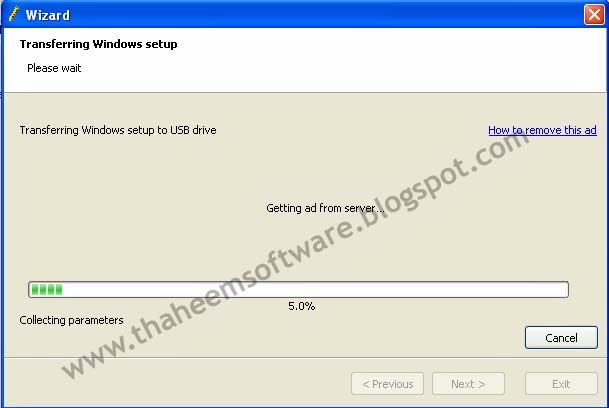
It will checking the USB drive, formatting the USB drive, Creating Partition, Create Boot-loader, Boot-sector, and copying "Windows XP File" to "USB Drive" after process is complete click NEXT button and click Finish to Exit,
Now Your Windows XP is ready to boot from USB Flash Drive and Ready to Install on you PC.
Enjoy. . . . !
How To Set Boot Order
Attach your USB Flash drive to your PC.
Start your Computer and load BIOS Setup by pressing, F1 or F2 or F10, after open system BIOS setup now select Boot Order, Boot Sequence,
Change priority, to 1st "Boot From USB Drive" and now Save and Exit system BIOS to Restart Computers. (This step might be different for different computers. Check your system guide to know how to change the boot order in your PC.)
Now system say "Press Any Key To Boot From USB Drive"
Press any key and then your windows Setup will Load and Windows Installation start shortly, Install Windows by following the on-screen instructions.

http://thaheemsoftware.blogspot.com

NOTE
If You See Any Broken Link Tell Me On Comments.
If You Like This Post Please Share It With Your Friends.

Please Share This Article

Monday, January 6, 2014

IDM 6.18 Build 7 With Serial Patch Crack Full Version Free Download


 IDM 6.18 Build 7 Latest 2014 Full Version 

Internet Download Manager Is One Of the accelerator software download IDM Best Most-Used. It Very Easy to Use This As IDM and download speeds Also Can Arguably the fastest. Unfortunately the software IDM Downloaded Available Only at this time that Will expired trial version If We Do not Have the Time serial number thirty day period. Well, at this time my article Will Share how to download movie with IDM. and Solve the Fake Serial Number Error Problem.

 HOW TO DOWNLOAD
1st
 2nd (if it show)
 3rd (if it show)

 NOTE 
If You See Any Broken Link Tell Me On Comments.
If You Like This Post Please Share It With Your Friends.

Serial Key Serial Number Serial Code
Product Key
  Password of All Files You Are Downloaded 
 www.thaheemsoftware.blogspot.com
( Make Sure Caps Lock is Off )
-------------------------------------------------------------------------
Download File on this Link http://www.adf.ly , This Site Is Blocked in INDIA , If you From INDIA just change the URL https://www.adf.ly to download this file, SORRY for this problem

IDM 6.18_Build 7 Download Links
 
 IDM 6.19 Build 2 Free Download
 
 IDM_6.18_Build_7 Full Free Download
IDM 6.18 Build 7 Full Free Download 
Please Tick In Reaction At The End Of Post

Sunday, January 5, 2014

How To Solve IDM Fake Serial Problem Easy Way | IDM Fake Serial Solution


 How To Solve Fake Serial Number Error Problem Easy Way 

Internet Download Manager Is One Of the accelerator software download IDM Best Most-Used. It Very Easy to Use This As IDM and download speeds Also Can Arguably the fastest. Unfortunately the software IDM Downloaded Available Only at this time that Will expired trial version If We Do not Have the Time serial number thirty day period. Well, at this time my article Will Share how to download movie with IDM. and Solve the Fake Serial Number Error Problem.

 Screenshots 
 Windows 7
Windows XP

 Solution:-

IDM have been registered with fake serial number . Be aware that the cracked product may work incorrectly and download files with errors. thus we advice you to purchase the full featured product .

 Lets Start:-


First You Need To Download The IDM 6.18 Version or WinRAR

(Scroll Down To See How To Download & Password of File)

1- Close & Exit IDM, from Taskbar, If Run, if already install the IDM please uninstall your IDM and reinstall the above IDM version for this hack, after install IDM.

2- Open your IDM directory C:\Program Files\Internet Download Manager and search for these files IDMGrHlp.exe and idmBroker.exe .

3- Rename IDMGrHlp.exe into TsHck (without extension)
 

4- Copy idmBroker.exe file and past it there.
5- Rename idmBroker.exe into IDMGrHlp.exe 

6- Restart you computer and enjoy. 
NOTE
    (This is only for 6.18 and previous version of IDM)
    After that Fake Serial Error Popup Message is not show again.

    Every start of your computer IDM tell (1) file is missing please reinstall the IDM, 
    Just press OK Button and Enjoying Downloading With IDM,
    This message is not show again before your next restart.
    Please Share This Article To Others

    Enjoy. . . . . . . . . . . . . . . . . . . . . . . . . . . . .!!!


 HOW TO DOWNLOAD - IDM Full version 
1st
 2nd (if it show)
 3rd (if it show)

 NOTE 
If You See Any Broken Link Tell Me On Comments.
If You Like This Post Please Share it With Your Friends. 

Serial Key Serial Number Serial Code
Product Key
 Password 
www.thaheemsoftware.blogspot.com